Submissions (15)

mypets's avatar
mypets10/27/2024

$5

My content creation experience is more on Instagram. While I was studying to get into college, I created a study Instagram and I'm going to tell you a bit about my experience.

First, develop a Concept. You need to have a clear and objective idea, so that it's clear what you want to communicate and convey. You need to put together your content by always asking yourself why this content is important, what you need to convey in your message and how to do this in an authentic way. I like to make a quick outline on the tablet or paper, as if it were a skeleton with the main points to organize. If you can, also make a plan of dates and resources for all your upcoming publications.

Know how to prepare the necessary materials and the environment in which you are going to present them. Make good use of colors, textures, sounds... conveying your proposal through every detail. I used to share summaries and reviews of books I'd read, so I'd try to set up an environment that was within that context and even conveyed the idea of the book.

Be focused on your objectives, always have an outline, but be flexible and understand that some changes can occur and even make everything more authentic. Be creative, go further, explore contexts and enrich your work by leaving your mark on it.

After assembling the content, now let's polish it up. Organize and simplify, making the language clear. Identify the main idea of your content in each part and focus on it, cutting out what isn't necessary. In texts, we need to make the formatting clear and a fluid and pleasant read is essential.

When publishing, leave the content in the ideal format for each platform, to ensure that you keep your audience's attention. It is vital that you know the network where you are sharing, so that everything is done very strategically. Find out the times when engagement is highest, encourage comments, shares and interactions, try to include hashtags and even find content creators to collaborate with. Whether it's creators with similar ideas, to gain a wider audience, or those with different proposals that are somehow complementary to yours, so that they reach more people.

Now it's time to monitor performance. With each publication, monitor engagement and interactions. From this feedback, you can adjust and adapt to grow your business and increase your reach even more!

yan57436's avatar
yan5743610/27/2024

$5

Since we're on Just About, I thought it would be interesting to share my creation of content involving guides on how to play with smite 2 characters.

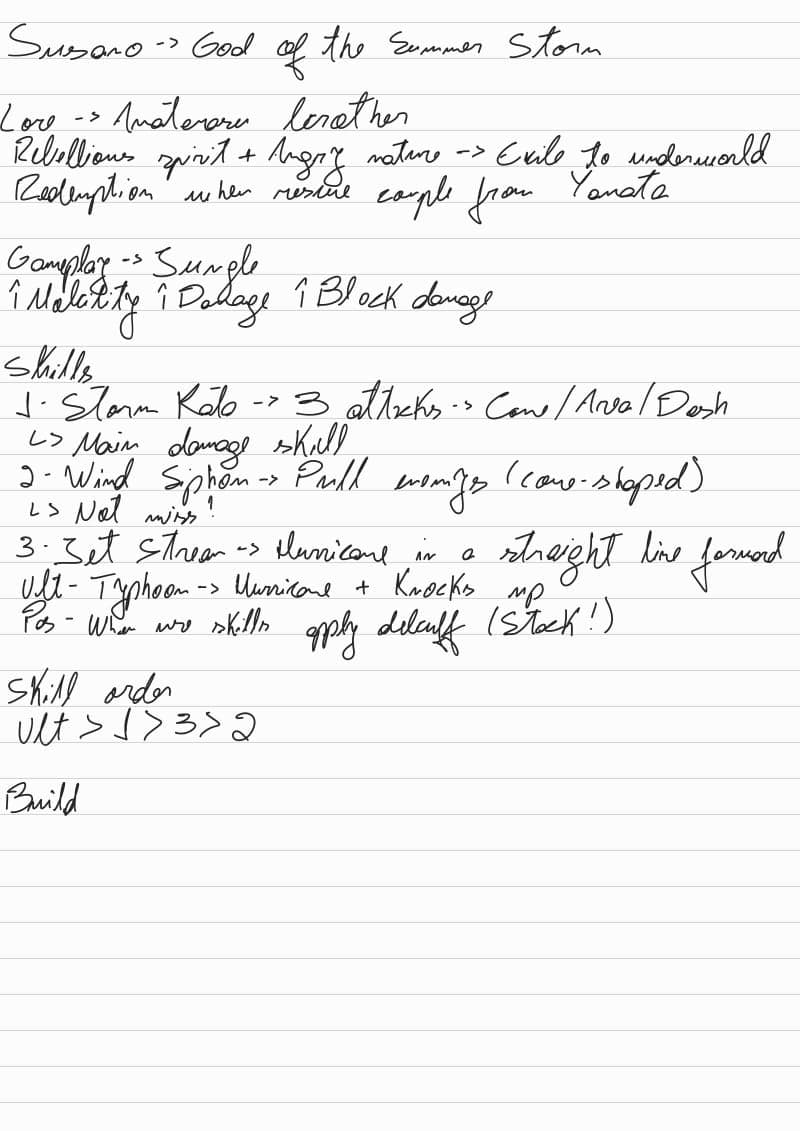
1 Conceptualizing: First I like to understand ABOUT the God I'm going to talk about, I like to see his lore and if possible associate his skills with his lore.

Why do I do this? I like to think that the devs make an effort to connect everything and that it's fluid and not forced at all. This helps me connect with gods that I used to just select and play, but never thought "After all, why is Susano so angry?" It changed my view of the game.

How do I approach knowledge? I like to access the smite 2 website and the fandom wiki a lot, they help me a lot, I rarely consume videos on YouTube, but understand that any way of expanding your knowledge is valid, whatever you do. It may sound silly, but it's really enriched my gameplays on Smite 2.

2 Outline: I believe that looking at your own work with a critical eye is very difficult, mainly because we have affection for everything that involves our own creation, so write it down beforehand, give it some time to rest and then look at it as if it were someone else's work, critically as much as possible, this is to exercise the criticism that other people will have with your work. If possible, ask someone else to look at it and criticize it, don't begrudge it, think of it as someone else's text and all the comments are to enrich the content.

3 Content: Whenever possible, try to add other sources of information to your content. If it's text, add an image or a video, all so that you can provide another perspective on what's on the screen. I often describe the ability of a God, but I'd like to insert a gif, everything can and should add up!

4 Editing: I like to keep my texts as aligned as possible, bolding what I want to focus on, setting priorities in the text, everything to make it more dynamic and enjoyable to read. It may not seem like much, but a text that appears to be easy to read is often written in a complicated way just to make it easier to read.

I'm posting one of my sketches to show you how I organize all the content (forgive me if the font is ugly, but I didn't think anyone except me would end up reading it haha).

Dydo's avatar
Dydo10/27/2024

$5

Creating Videos: beginner's quick guide1. Generating and Developing Ideas

First of all, begin with a general idea or theme that interests you. For example “Exercise and diet”. Then focus on a specific angle, for example, “How new diets are changing the way we exercise... and backwards” and write down all your thoughts (even the random ones). You have to dig in on researching and outlining the theme of your video, start by reading multiple sources on your topic, statistics, research papers, etc. Then identify 3-5 key-words so you can organize your ideas through them.

Now we start the process of writing down a script, like with a compelling hook in the introduction to grab attention, as a question, startling fact or a joke.

Then, write each section according to your research and outline, selecting the subtopics on an relatable order so you can create smooth transitions (not only as an video-edit effect, but also on your speech) and ensure your audience is understanding you by reviewing what you write. If you have a trusted friend, ask him to read your script or even to help you recording it, as a second thinking mind might help you improve your mistakes and/or make your hits shine even more.

2. Editing and Polishing

Now it's the part that you probably spent the majority of your time. You can choose to learn how to use an advanced video editor, like Premiere or Vegas, but I advise you to start with something simple, like Microsoft Clipchamp, which is free, doesn't fry your pc and has all you need to start, letting you make cuts and organize your tracks, add audio, accelerate or slow down your video and add visual templates so you can illustrate your ideas.

The most important thing is to try out! If you're insecure, remember that you always have ctrl+z so you can undo the changes you've just made and to save constantly so you don't risk losing your precious work (you would be surprised at how common this is).

Separate video and audio tracks from each other (unlink them), and then in different channels so you can work with them separately. That helps to understand the resources avaiable to you on the editor. Also, try to put a marker on each track so you don't get lost in your own process.

3. Finalizing and Publishing

Now it's time to think about the title, description, external links, and a thumbnail. Try to create an apellative title that at the same time doesn't push away your public for being too saucy or exaggerated. The description should have informations about you, the video itself and other informations that you mention on the video.

Review everything one last time... and publish!

Don't be shy for being shy, it's only the beginning of your journey as a content creator, and this guide intend to help you with it. You need to get experienced so you can improve, and this only gonna happen if you try and try and try, even if you're just making mistakes (which is impossible though).

Tips:

  1. Respond to comments, questions, and feedback to engage with your viewers and build a community.

  2. Use analytics to measure how your content is performing, and use that data as basis for future videos.


JHenckes's avatar
JHenckes10/27/2024

I believe that creating content involves organizing what you have to do! Most content creators have the main difficulty of always innovating, always coming up with creative ideas (and I include myself in this).

So it's very important to have a roadmap for creating content! I usually record content on Instagram about medical subjects and I have a script that I try to follow to the letter so that the videos have some reach and I always manage to cover various subjects in the best possible way:

1 - Planning: At the beginning of each month, I look at the medical topics that are trending and I also take my experiences from the hospitals I've been to during the month and from there I define various topics to cover in different publications and reels. This planning is important because I avoid wasting time on moments like “what am I going to record today?”.

2 - Tools, Software and Creating the Content: I already have predefined the programs I use to record and edit my videos and publications: I don't think there's a rule as to which one you should use in this case, it really depends on what you want to record, the message you want to convey and how detailed you want to make it.

In my case, I use Canva to edit my posts, as I have a PRO account on the site, which allows me to make my posts look professional. For the videos I have my LED light, a stand for my iPhone (which I use to record the videos) and a video background already organized around the theme of medical content, which is what I use most for the videos. For editing, I use free apps from the apple ecosystem itself (I have a MAC and an iPhone), since I don't need such detailed editing, as my audience is patients and medical students!

Having all these things ready allows me to advance the production of the videos and make my job easier!

3 - Finalizing and Publishing: To complement the content of the video or post, I prepare a short text that I put in the description of the post (I usually do this text before I even record the video, as it works as a review of the content and confirmation of information before I actually take action!)

I also add a few hashtags that have to do with the topic, and set the video time to less than 1 minute so that the Instagram robot can help me promote the content to people who don't follow me.

Finally, I prepare the cover of the publication, always looking for a catchy phrase, but never fake news, since the first impression is the one that counts

4 - Conclusion: After all this, all you have to do is publicize the video, ask for help with shares, invest a little money to make it easier for it to reach people, among other things. And that's how I prepare, record and finalize my videos! I believe that all this organization allows me to be immensely satisfied with my creations and I hope that I can help those who need it!

FirestormGamingTeam's avatar
FirestormGamingTeam10/27/2024

Any form of content takes ideas but also the execution of said ideas can be very challenging. Fo me my focus at this point is Minecraft and it's in both modded and vanilla Minecraft.

Vanilla Minecraft

So our current content is what we are calling "Full Revamp" - This has essentially meant that we went looking for a large Minecraft village, the idea is to turn the village into a more "cyberpunk" feel to it.

  1. Locating a village on Minecraft that suits our needs, due to how some villages spawn, we needed to spend time, locating several villages on the server.

  2. Once located, we needed to choose the theme of the village, we had initially gone with Medival but changed our mind as we wanted more of a challenge.

  3. When choosing the blocks, we had to make sure the blocks worked as a whole so we went with a very heavy black deepslate feel to the village.

  4. Next, we had to replace every block in the village that was either wood, cobblestone, or stairs with deepslate materials.

  5. Now it's time to load up OBS (recording software) and begin recording the transformation process, which was the original idea.

  6. Once the videos are done, it's now time to render the videos.

  7. Time to load Vegas Pro up.

  8. Once the files are loaded up, each file has to be manually selected and "disable resample" clicked off, this stops the Minecraft videos from appearing to "blur" when you move.

  9. Once that's done, audio/mic levels have to checked to make sure the game sound doesn't overpower the speaking element of the videos.

  10. Once that is done and the videos are rendering, we now need to choose thumbnails or create them.

  11. Then comes the uploading stage, this is where you need to choose tags/descriptions/hashtags - All of which are super important to your video's visibility.

Creating Minecraft content requires an idea to take shape and to execute that idea, the above steps will help anyone in the steps needed.